
A Wms Warehouse System is the operational brain behind a modern warehouse. It connects receiving, storage, picking, packing, and shipping in one controlled environment. When a truck arrives, workers can scan cartons, verify quantities, and assign locations within minutes. The system records each movement, creating a clearer inventory history than handwritten notes or isolated spreadsheets.
In practice, a Wms Warehouse System uses barcode scanners, mobile terminals, warehouse maps, and inventory rules. It may recommend a shelf near the packing area for fast-moving products. It can also guide a picker through the shortest practical route, reducing unnecessary walking. Managers gain dashboards showing stock levels, order progress, delays, and employee workload. These details support better decisions, but software cannot repair inaccurate data or careless processes. That limitation is easy to underestimate.
Reliable implementation usually begins with clean product records, defined storage locations, and trained warehouse staff. Experienced teams test receiving and picking workflows before expanding system access. They also compare system reports with physical counts, because a digital record can still be wrong. Integration with enterprise resource planning, transportation, and e-commerce platforms may improve visibility across the supply chain. However, every connection adds maintenance responsibilities and possible failure points. This guide explains how a Wms Warehouse System works, where it creates measurable value, and which practical weaknesses deserve attention before adoption. Warehouses are not perfectly predictable. A thoughtful system should support people, not pretend to replace their judgment.
What Is a WMS Warehouse System?
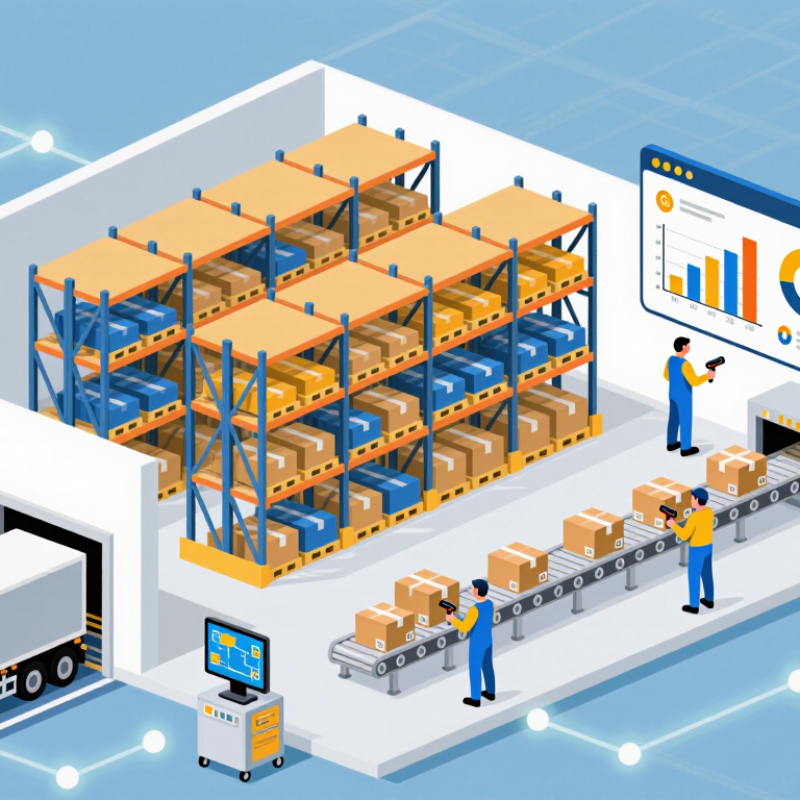
A WMS, or Warehouse Management System, is software that controls daily warehouse operations. It records where goods arrive, where they are stored, and when they leave. Workers can scan a carton at receiving, view an assigned shelf, and confirm each picking step on a handheld device. The system connects inventory data with orders, labor, storage locations, and shipping tasks.
A WMS usually works through rules and real-time updates. When stock arrives, it creates a digital receipt and suggests a suitable location. During picking, it can select items by order priority, distance, or expiry date. After packing, it updates available inventory and sends shipment information to other systems. The Material Handling Institute’s 2024 Annual Industry Report surveyed more than 2,000 supply-chain professionals. Its findings show that digital tools remain a major investment priority. A WMS supports that shift, but it cannot repair inaccurate item data or poor warehouse processes. That limitation is easy to underestimate.
Tips: Start with clean product records, clear location labels, and practical workflows. Test the system with real orders, including damaged cartons and short picks. Train workers beside the storage racks, not only in a classroom. Review accuracy, picking time, and order delays every week. A perfect system is unlikely. Continuous adjustment is more realistic.
| Category | Data Dimension | What It Covers | Typical Data or Operating Logic |
|---|---|---|---|
| System Definition | Warehouse Management System | A software system used to control, record, and optimize warehouse activities and inventory movements. | Manages receiving, putaway, storage, replenishment, picking, packing, shipping, counting, and reporting. |
| Primary Objective | Inventory and order control | Provides accurate, timely visibility into inventory quantities, locations, status, and order progress. | Centralizes transaction records and updates inventory after each confirmed warehouse movement. |
| Inbound Process | Receiving | Records products arriving at the warehouse and compares physical receipts with expected inbound information. | Common data includes item identifier, received quantity, lot or serial number, supplier reference, arrival time, and condition. |
| Inbound Process | Putaway | Assigns received inventory to suitable storage locations according to warehouse rules and available capacity. | Location selection can consider item dimensions, storage conditions, product compatibility, turnover rate, and space availability. |
| Inventory Control | Location management | Maintains a digital map of warehouse areas, aisles, racks, shelves, bins, staging zones, and other locations. | Each location may have an identifier, capacity, status, zone, storage restrictions, and current inventory balance. |
| Inventory Control | Stock status | Separates inventory according to whether it is available, reserved, damaged, quarantined, under inspection, or in transit. | Available quantity is not necessarily equal to physical quantity because reserved or restricted stock may not be allocatable. |
| Inventory Control | Lot and serial tracking | Tracks inventory by batch, lot, serial number, expiration date, or other traceability attributes when required. | Supports traceability, recall management, expiration control, and compliance-related warehouse records. |
| Outbound Process | Order allocation | Reserves suitable inventory for customer, production, transfer, or replenishment orders. | Allocation rules may use stock availability, order priority, expiration date, lot requirements, and fulfillment location. |
| Outbound Process | Picking | Creates instructions for warehouse workers or automated equipment to retrieve products from storage locations. | Common picking methods include single-order picking, batch picking, zone picking, wave picking, and cluster picking. |
| Outbound Process | Packing and shipping | Verifies picked items, prepares shipments, records packaging details, and confirms goods leaving the warehouse. | Records may include packed quantity, package dimensions, weight, shipment reference, destination, and dispatch time. |
| Automation | Barcode and RFID scanning | Captures item, location, container, and transaction information electronically during warehouse operations. | Scanning reduces manual entry and can improve transaction accuracy when labels, devices, and procedures are properly maintained. |
| Automation | Material-handling equipment | Connects warehouse processes with equipment such as conveyors, sorters, storage systems, mobile robots, or automated guided vehicles. | The WMS may send work tasks to equipment and receive status updates, completion messages, exceptions, or error conditions. |
| Replenishment | Forward-pick replenishment | Moves inventory from reserve storage to picking locations before available picking stock reaches an operational limit. | Replenishment triggers may include minimum quantity, maximum quantity, demand forecast, open orders, or scheduled work waves. |
| Inventory Accuracy | Cycle counting | Counts selected inventory regularly instead of relying only on a single full physical inventory count. | Count frequency can be based on item value, movement frequency, risk level, variance history, or operational importance. |
| Task Management | Work assignment | Converts warehouse requirements into tasks and assigns them to workers, equipment, or automated processes. | Task prioritization may consider due time, travel distance, warehouse zone, worker qualification, equipment availability, and order priority. |
| Integration | Enterprise and commerce systems | Exchanges orders, product information, inventory balances, shipment confirmations, and other business data with connected systems. | Common integration methods include application programming interfaces, file exchange, message queues, and structured business documents. |
| Integration | Transportation coordination | Shares shipment details with transportation or delivery processes to support dispatch planning and shipment visibility. | Relevant information can include carrier service level, route or delivery reference, package count, weight, destination, and status. |
| Performance | Inventory accuracy | Measures how closely recorded inventory matches the physically verified quantity. | A common calculation is: accurate inventory records divided by total inventory records, multiplied by 100. |
| Performance | Order picking accuracy | Measures whether the correct items and quantities are picked for released orders. | A common calculation is: correctly picked order lines divided by total picked order lines, multiplied by 100. |
| Performance | Order cycle time | Measures the elapsed time between order release and order completion or shipment confirmation. | Results are commonly analyzed by order type, warehouse zone, shift, priority, and processing stage. |
| Performance | Dock-to-stock time | Measures the time required to receive goods, complete verification, and make inventory available for storage or fulfillment. | Shorter dock-to-stock time can improve inventory availability, but performance depends on receiving workload, inspection, labeling, and putaway capacity. |
| Core Workflow | End-to-end operating sequence | A WMS coordinates physical activities and system confirmations throughout the warehouse. | Receive Verify Put Away Store Allocate Pick Pack Ship Reconcile |
| Operational Benefits | Visibility and control | Improves access to current warehouse information and creates a consistent record of inventory transactions. | Benefits may include better location visibility, more structured work execution, improved traceability, and faster exception detection. |
| Implementation Factors | Data and process readiness | Successful operation depends on accurate master data, defined warehouse processes, reliable labeling, trained users, and system integration. | Important preparation areas include item dimensions, units of measure, location master data, inventory opening balances, business rules, and exception procedures. |